












Choose the apps each team needs. They are built to work together.
Growth, Operations, People, Finance, Platform and AI each have their own apps. Use any app on its own or several together, and customize them to fit how your teams work.

Track leads, contacts, deals and follow-ups through each stage of the sales process.
Explore
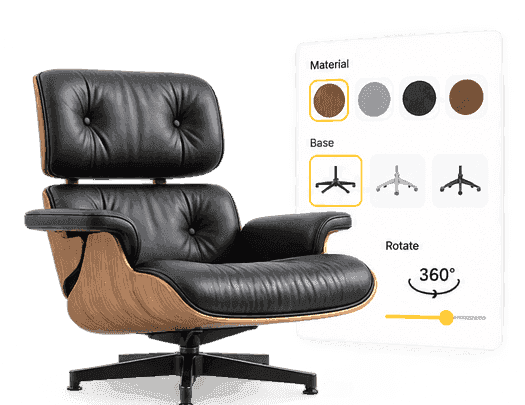
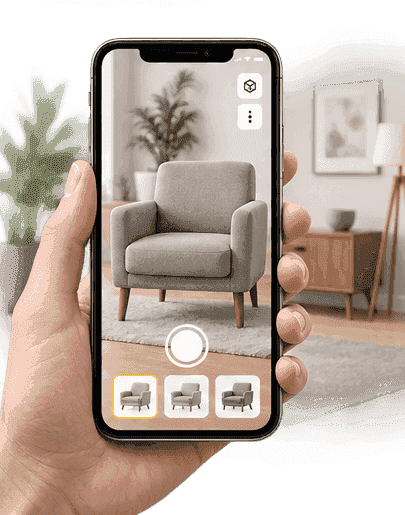
Configure products in 2D, 3D or AR, calculate pricing and prepare customer quotes.
Explore
Plan and launch marketing campaigns to reach and re-engage the right customer segments.
ExploreCreate work orders, schedule technicians and track maintenance and service visits.
Explore
Plan project tasks, assign owners and track delivery against milestones.
Explore
Log customer enquiries and service issues as tickets and track each one to resolution.
Explore
Reserve rooms, services and stays, set availability rules and track every booking's status.
ExploreKeep employee records and manage attendance, leave and workforce administration.
ExploreRun employee training, track course progress and build the skills each role needs.
Explore
Raise invoices, record payments and follow up on what is still outstanding.
ExploreTrack stock levels and movements, and see which items are due for reorder.
Explore
Exchange data between EVOQ applications and your existing systems through supported integrations.
Explore
 Agent assigned
EVI, the AI assistant, and AI agents that prepare defined tasks for your approval.
ExploreAsk EVI. An agent prepares the work. You decide when it acts.
Ask EVI a question and it pulls context from your EVOQ apps. An agent then prepares the task and shows you the result. You decide how much it does on its own.
- EVI
- The assistant you ask in plain language, inside your applications.
- AI agents
- Carry out defined tasks, such as preparing follow-ups, with approval where required.
 EVIAssistant
I found 3 opportunities closing this week. Context I used:
 CRM 3 opportunities closing this week
 Billing Bluepeak Studio: invoice INV-2486 overdue
 Desk Northgate Partners: ticket #4821 open
I've passed this to Ava, the Follow-up agent. Ava is set to ask for your approval before sending.
 AvaFollow-up agent
Task: draft a follow-up email for each opportunity, using the context EVI retrieved.
- Carlos Mendes, Northgate PartnersMentions the open delivery ticketPreparing
- Amara Okoye, Bluepeak StudioAsks to settle INV-2486 before renewalPreparing
- Hannah Weber, Alder & FinchNo email address on the contactPreparing
You ask EVI in plain language.
EVOQ for healthcare, manufacturing, hospitality and more.
Each industry solution starts with the problems teams in that field deal with, then shows the EVOQ apps that address them and how work moves between them.
Healthcare
Referrals, bookings, reminders and patient feedback sit in separate tools, so follow-ups get missed.
From referral to return visit, every step has an owner.
Referrals reach the first appointment, follow-ups go out on schedule, and patients are asked how their visit went. Providers and the front desk work from the same patient history.
- Referrals tracked to the first appointment
- Appointments and providers scheduled
- Follow-ups and reminders sent on time
- Feedback and returning-patient rewards
 Practitioner
 Nurse
 Front desk
 Patient
 CRM
 Campaigns
Drafted 4 reminders for overdue follow-ups
EVI gathers the context. The agent prepares the work.
Before an agent prepares anything, EVI brings together the records, documents, recent activity and instructions that apply to the task, within what that agent is permitted to access. You decide how much the agent does without asking.
Explore EVI and agentsPrepare the next step
Review the request, the expected outcome and what needs to happen next.
Understand the full picture
Related people, accounts, records and current statuses that affect the task.
Follow the right guidance
Relevant documents, internal procedures, policies and instructions.
Prepared from the context available to this agent, within its configured permissions.
- Task and expected outcome understood
- Records, guidance and activity considered
- Rules applied, approval requested
The context each agent uses depends on how it is configured and what it is permitted to access.
Keep the tools you already use.
EVOQ connects to them.
EVOQ apps share records with each other and connect to supported tools such as Gmail, Slack and QuickBooks. Sync exchanges data with the systems you already run, so your teams do not have to copy information between them.
 Gmail
 Slack
 Microsoft 365
 QuickBooks
 Stripe
 Shopify
 WooCommerce
 Zendesk
 NetSuite
 Google Analytics
 Make
Connecting a tool does not give AI agents access to it. Agents only use the data and actions you permit.
See all integrationsBring a workflow.
See how EVOQ handles it.
Pick a workflow that matters to your teams. We will show it step by step in EVOQ, with the apps involved and the tools you want to keep.